
The most useful amazon seller tools fall into seven jobs: keyword research, listing optimization, PPC management, profit and inventory tracking, review and account-health monitoring, refund recovery, and competitor intelligence. You do not need all of them on day one. Start with the two or three that fix your biggest leak, then add as you scale. Here is how to choose.
Every seller eventually drowns in tabs. The fix is not more software, it is the right stack for your stage. A brand doing $20K a month needs different tooling than one doing $500K, and paying for enterprise suites you barely touch is one of the quietest ways to erode your margin. This guide maps the categories, what each one actually does, and where most sellers overspend.
Key takeaways
- Buy by job, not by brand. Match the tool to the problem you have right now.
- Three categories matter first: keyword research, PPC management, and profit tracking.
- Free tools go further than people think, especially Brand Analytics and Seller Central reports.
- Tools surface problems; they do not run your account. The work is still the work.
The seven categories of Amazon seller tools
Almost every product on the market fits one of these jobs. Knowing the category makes it obvious whether you actually need another subscription.
| Category | What it does | Who needs it first |
|---|---|---|
| Keyword research | Finds the search terms buyers use, with volume and difficulty. | Every seller launching or relisting. |
| Listing optimization | Scores titles, bullets, and backend terms against best practice. | Sellers with stalled organic rank. |
| PPC management | Automates bids, dayparting, and negative keywords. | Anyone spending over a few thousand a month on ads. |
| Profit & inventory | Tracks true net margin after fees and forecasts restocks. | Sellers who do not know their real profit. |
| Reviews & account health | Alerts on new reviews, policy flags, and listing changes. | Brands protecting an established catalog. |
| Refund recovery | Audits FBA fees and lost or damaged inventory for reimbursements. | Any FBA seller with real volume. |
| Competitor intelligence | Tracks rival pricing, keywords, and stock levels. | Sellers in crowded categories. |
Start with keyword research
Keyword research is the foundation, because rank and ad efficiency both depend on targeting the terms buyers actually type. A good tool shows search volume, an estimate of difficulty, and the related phrases competitors rank for. Use it to build your title, bullets, and backend search terms around real demand instead of guesses.
You do not have to start with a paid suite. Amazon's own search bar autocomplete and Brand Analytics (if you are enrolled in Brand Registry) reveal high-intent terms for free. Layer a paid tool on top once you need volume estimates at scale, or once you are managing enough SKUs that manual research eats your week.
Keyword research feeds the next job: listing optimization. A listing tool scores your title, bullets, images, and backend search terms against best practice and flags what is missing, so the keywords you found actually make it into the places Amazon reads. Think of research as finding the demand and optimization as capturing it. Doing one without the other is how strong products stay invisible. Get both right before you spend a dollar on ads, because paid traffic to a weak listing just burns budget.
PPC management is where money leaks fastest
Advertising is the line item most sellers overpay on. The right PPC tool automates the repetitive work, pulling search-term reports, adding negatives, and adjusting bids, so spend follows performance instead of habit. Stop overpaying on wasted ad spend by reviewing your search-term report weekly, with or without software.
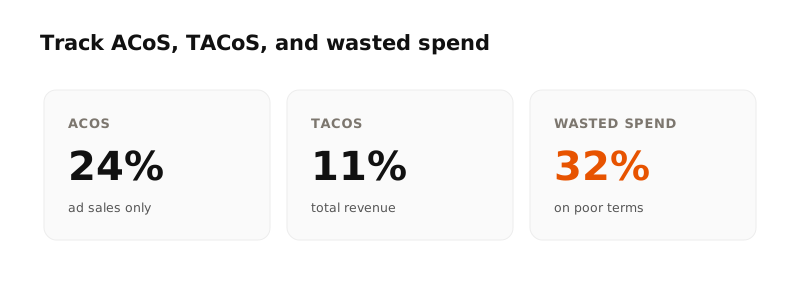
That said, automation amplifies your strategy, it does not replace it. A tool bidding toward the wrong target just loses money faster. If ads are eating your margin, a focused Amazon PPC management pass usually pays for itself before the tooling does.
Know your real profit
Revenue is vanity, net profit is sanity. A profit-tracking tool connects to Seller Central and subtracts referral fees, FBA fees, storage, returns, and ad spend so you see what each product actually earns. Many sellers discover a hero product is barely breaking even once every fee is counted.
The same category usually handles inventory forecasting, warning you before a bestseller runs out (lost rank) or overstocks (storage fees). For a young brand, a simple spreadsheet works. Graduate to software when SKU count makes manual tracking error-prone.
Recover money you have already lost
If you use FBA, Amazon owes more sellers money than they realize. Inventory gets lost in the warehouse, damaged in transit, or returned and never restocked, and fees get miscalculated. A refund-recovery tool audits your transaction reports and files claims for these discrepancies. For a seller moving real volume, this often puts thousands back in your account that would otherwise vanish. It is one of the few tools that pays for itself directly rather than indirectly.
Protect an established catalog
Once you have rank and reviews worth defending, monitoring becomes its own job. Review and account-health tools watch for the events that quietly cost you sales: a sudden negative review on a hero product, a listing edit you did not make, a suppressed image, or a policy flag that threatens suspension.
The value here is speed. A hijacked listing or a stranded ASIN caught the same day costs you a little. Caught two weeks later, after rank has slid, it costs you a recovery campaign. Set alerts so problems reach you before they reach your revenue. Alerts only help if someone acts on them quickly, which is exactly where a managed account earns its keep.
Tools every seller can use for free
Before paying for anything, exhaust what Amazon already gives you. These cover a surprising amount of ground.
- Brand Analytics: top search terms, click and conversion share, and demographics, free with Brand Registry.
- Search-term reports: exactly which queries trigger and convert your ads.
- Inventory and restock reports: Amazon's own forecasts of what to reorder and when.
- Account Health dashboard: policy, performance, and listing-risk alerts in real time.
How to choose without overspending
Pick tools in the order your problems appear. Launching? Keyword research first. Bleeding on ads? PPC next. Not sure if you are profitable? Add profit tracking. Resist bundling into a single expensive suite until you are actually using most of its modules.
A simple stack by stage
- Starting out (under $20K/mo): one keyword tool plus Amazon's free reports. That is enough.
- Growing ($20K to $100K/mo): add a PPC tool and a profit tracker so growth does not hide leaks.
- Scaling ($100K+/mo): add refund recovery, review and account-health monitoring, and competitor intelligence.
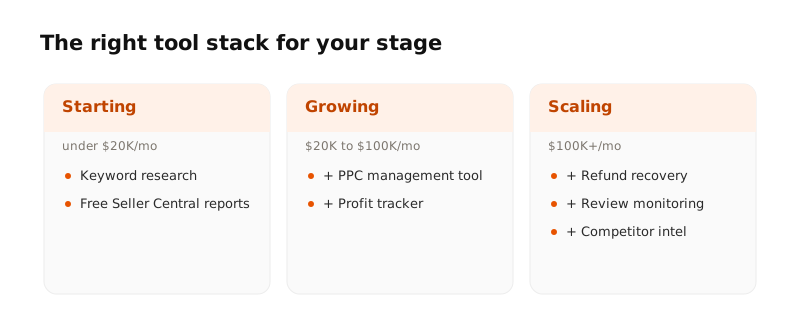
The best stack is the smallest one that answers the question keeping you up at night. Everything else is a subscription you will forget to cancel.
If you would rather skip the trial-and-error, this is exactly what a full-service partner handles. Our done-for-you Amazon management brings the tooling, the data, and a senior operator who reads it, so you are not paying for software you do not have time to use.
The bottom line
Amazon seller tools are force multipliers, not autopilot. Choose by the job you need done, lean on Amazon's free reports first, and add paid tools only when scale demands them. The sellers who win treat tooling as support for a clear strategy, not a substitute for one.